Web app
Draw-a-box tool
I was drawing the 250 Box Challenge in Krita and couldn't tell whether I was getting better. This is a canvas that checks each box as soon as it's finished.
- Kind
- Web app for a pen display
- Built with
- Python, FastAPI, SQLite, TypeScript
- Data
- Stays on the computer
- The problem
Drawabox's 250 Box Challenge is 250 boxes drawn in perspective, with the edges extended back to see where they meet. I was partway through it, drawing on a pen display in Krita and adding each box's extension lines by hand, colour-coded by direction.
After 28 boxes I couldn't tell whether I was improving, which of the three sets of edges kept going wrong, or what to change on the next box. The only feedback was my own eyeballing.
Patterns across boxes don't show up one box at a time. Drawing every box facing the same way is one (the challenge asks you to vary it). Community critique comes per page, days later, if at all.
- What I built
A local web app that is the canvas. It finds the twelve edges among my marks, works out where each set of edges actually meets, and scores the box out of 100 the moment I tap done.
The scores are only ever compared with my own earlier boxes. The limits for how much a line may wobble, bow or overshoot were first set on generated boxes, then adjusted against my own as I used the tool, which I still do.
It showed me something I couldn't see on my own. My lines toward the vanishing point were often off, and I'd been doubting the lines I drew after the box. The script made it clear I had just missed the vanishing point.
Below is every main screen, with my own boxes on it. The dates, the prompt and the warmup sheets are made up. Where a picture carries a number, it matches a note under it.
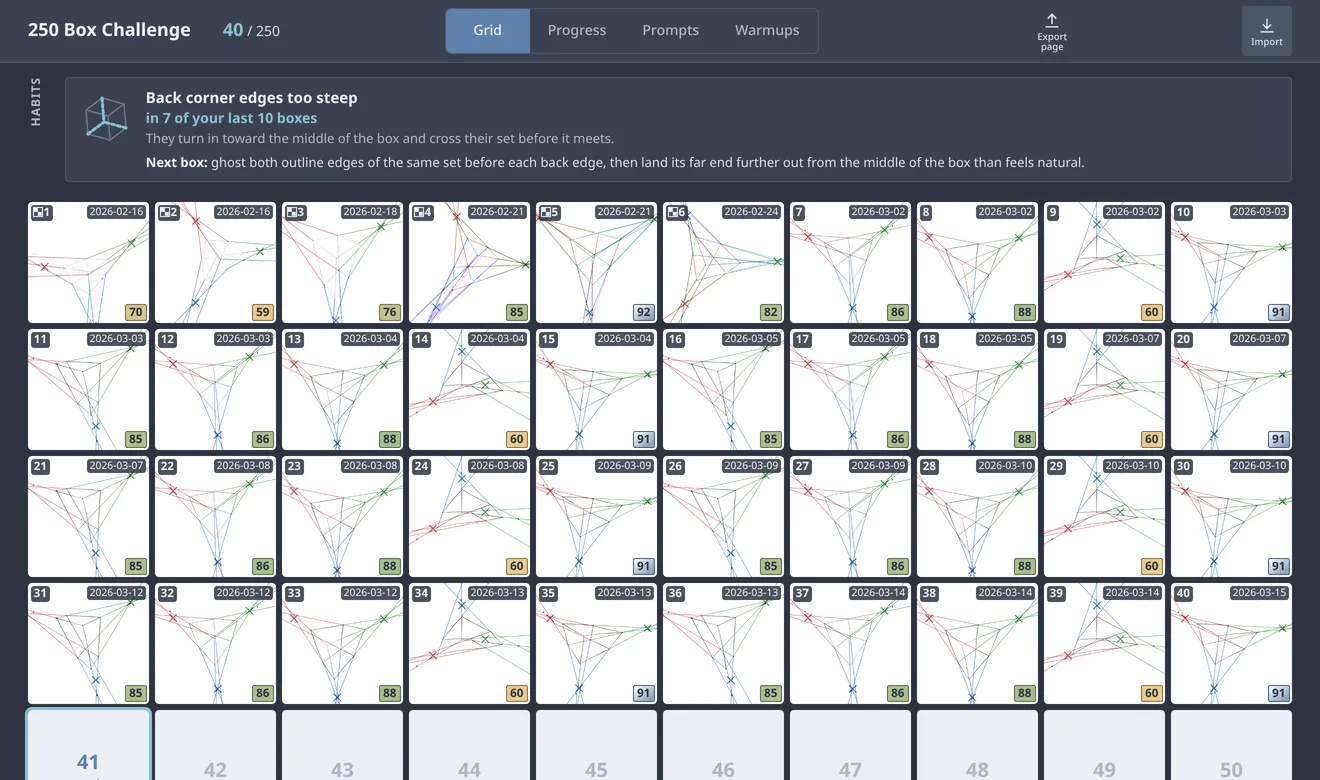
- Grid
The home screen. It's the same 250-cell page I kept in Krita, ten cells wide, so the app felt like a continuation rather than a restart. The grid filling up is the progress bar.
Each box is stamped with its number, date and score, and the date is written YYYY-MM-DD the way I'd always dated my boxes.
- Boxes from Krita. The small checker marks a box brought in from my old page. It's scored on convergence only, and the mark keeps that score honest about what it's missing.
- The badge colour. Red to yellow to green, and platinum from 90 up. Gold read as yellow at a glance, so the top grade became something that couldn't be mistaken for it.
- The next box. Boxes sort by the date they were finished, and the first empty cell is the one lit up. Tap it to draw.
- Habits. What keeps going wrong across recent boxes, strongest first. It sits on the grid because it reads from many boxes, not one. Each one comes with what to try on the next box.
- Four views, one switch. The view I'm on is marked and isn't a button, so no page has a button that leads back to itself.
- Export and import. Export saves the whole page as one picture for posting to critique. Import brings in boxes I'd drawn in Krita.
- Drawing a box
Tap the next cell and the board fills the pen display.
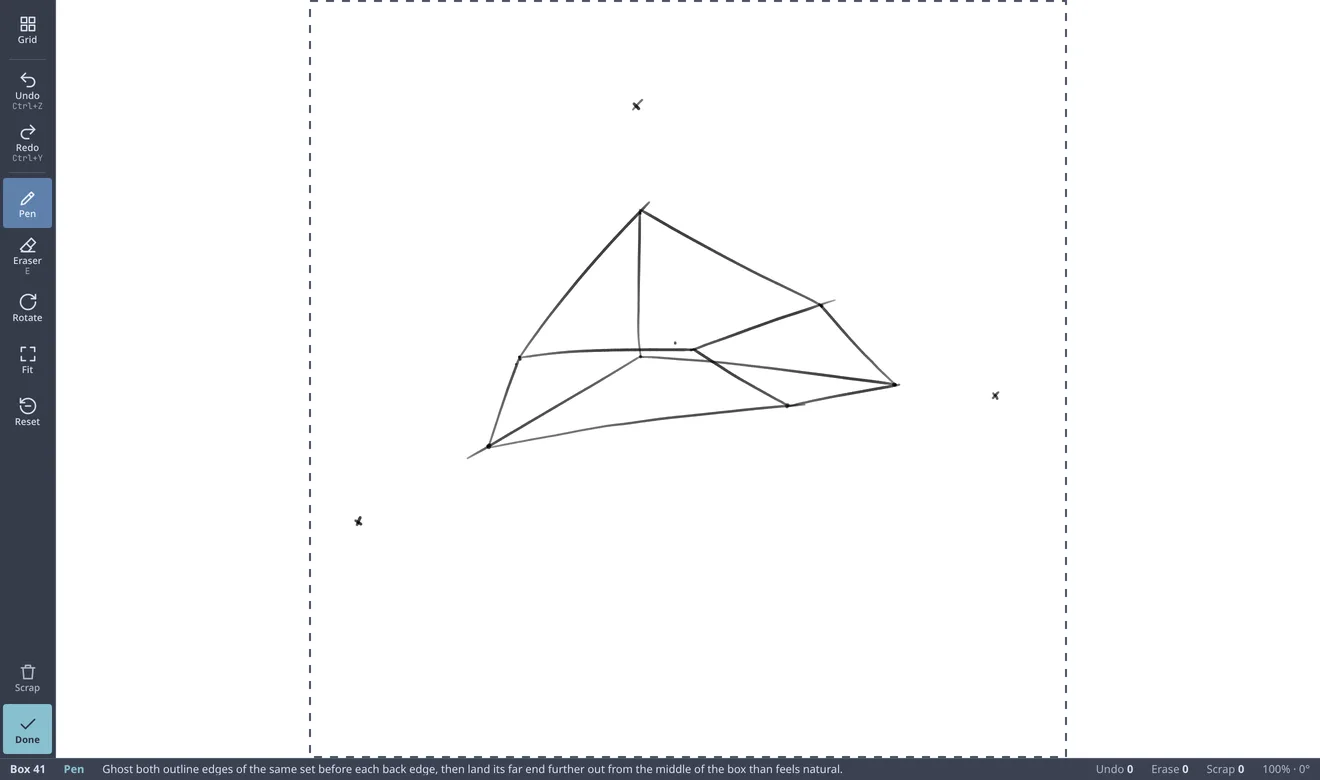
- Buttons sized for a pen. Every control is a large icon button, never a text link, because tapping small text with a pen is hard. Undo, redo and the eraser answer to the keys my pen display's buttons were already set to, so my muscle memory kept working. Each key is printed on its button.
- Pressure. The brush width and ink darkness follow pen pressure, with ranges measured from my Krita boxes. Sometimes I draw faintly on purpose, so the faint lines had to stay faint.
- The graded square. The dashed square is what gets scored. The space around it is there for panning, zooming and turning the board to get a better angle on a line.
- A tip where I can act on it. The status line carries one short tip for the box, drawn from what recent boxes got wrong. It never sits over the drawing.
- Raw counts. Undos, erases and scraps for this box. They're only a record: the score charges for something narrower (see Result).
- Done, out of the way. Done sits alone at the foot of the rail, so a stroke can't land on it by accident, and it stays off until there's a pen line on the board.
- Result
What the app makes of a box, shown on the board where I drew it.
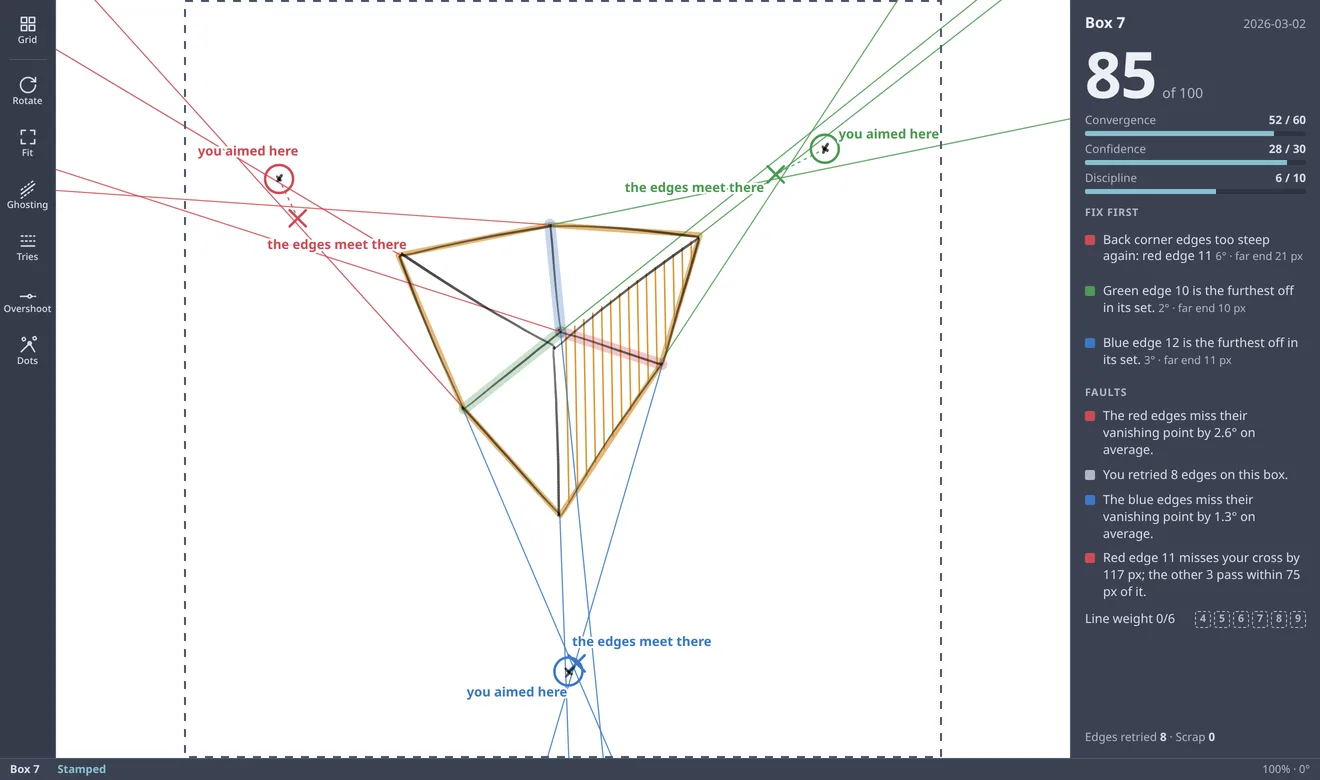
- Fix first. The worst edge in each set and how far its far end is off (here 21, 10 and 11 px). Hover or tap a line and the correction is drawn on the board, not just written out.
- What I skipped. A box finished without hatching or line weight gets them drawn in amber, so the gap is visible.
- Discipline. Only a retried edge costs points, plus a scrapped attempt. Erasing is free. I expected to score near zero if every undone stroke counted, because I undo and redraw an edge several times.
- More on request. Ghosting, tries, overshoot and dots each draw one more layer over the box. Ghosting is rehearsing a line above the screen before drawing it, read from the pen's hover.
- Progress
The view that answers "am I improving?".
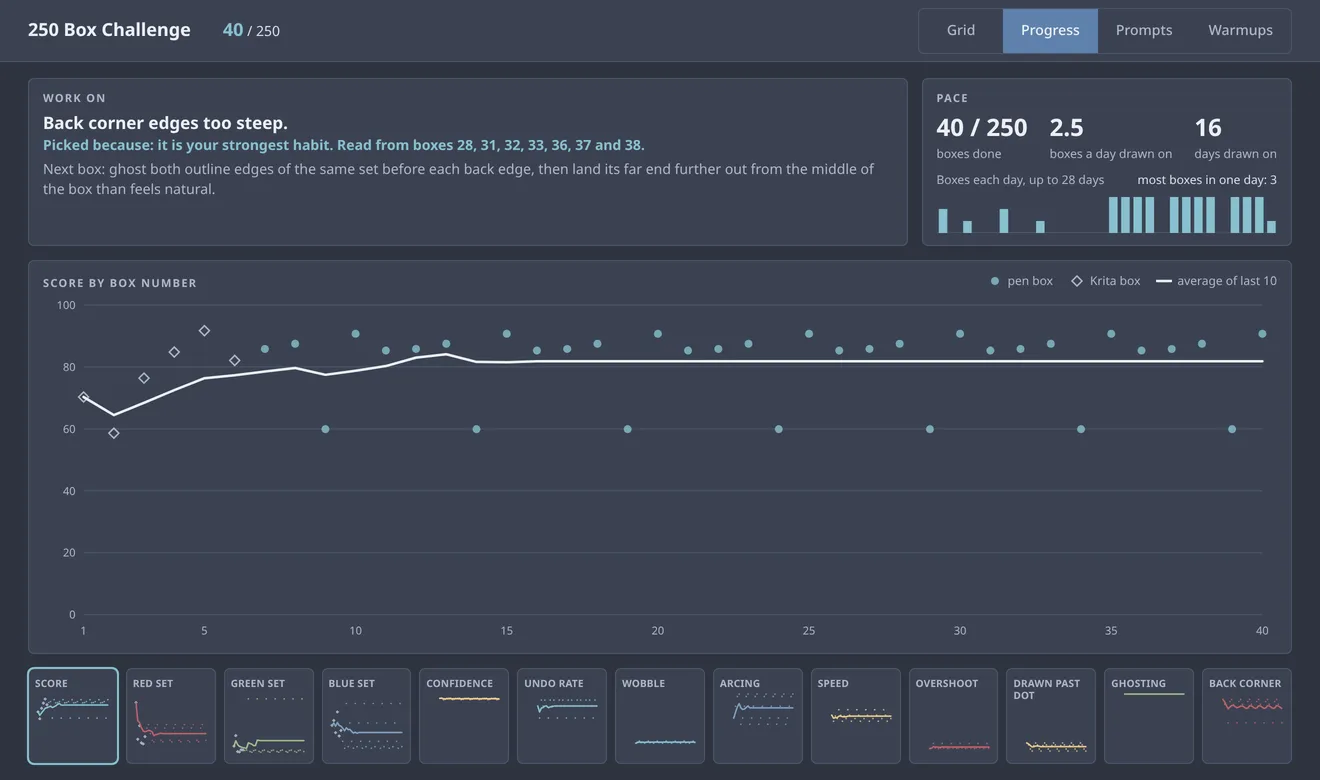
- One thing to work on. Fixed rules, asked in a fixed order over the last ten scored boxes, and the first one that fires wins. The same boxes always give the same line, and "Picked because" says which rule and which boxes.
- Pace. There's no projected finish date and no streak count.
- Two kinds of box. Pen boxes are dots and Krita boxes are diamonds, so they differ by shape and not only by colour. The Krita ones have no confidence data, and the chart shouldn't hide that.
- The rest of the data. Tap a tile and it takes the big chart's place, so nothing on the page scrolls.
- Import from Krita
The boxes I'd already drawn in Krita had to come with me, and for a while I kept drawing some there.
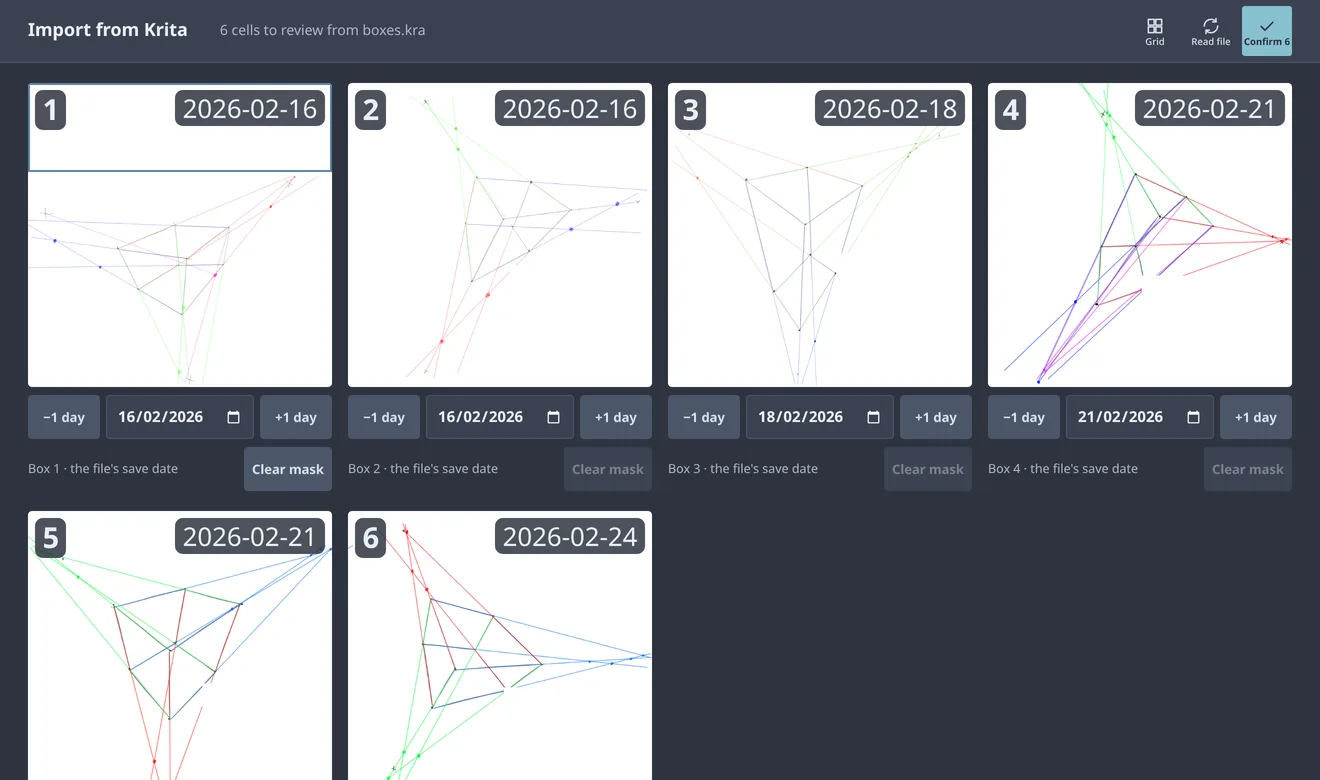
- Read from the file. The app reads the page Krita saves inside its file, cuts it into cells in reading order and stops at the first blank one. Running it again only picks up new cells.
- Number and date. The number comes from the cell's place on the page and can't change. The date can be wrong, so it's checked here before anything is scored.
- Masks. A rectangle dragged over a cell is painted out before analysis, so handwriting never gets read as an edge. My first cell had notes across the top, so it starts with one (the notes are blanked out of this picture).
- Confirm. Each cell is stamped into the grid and scored on convergence only. If a box drawn in the app already holds that number, it moves to the next free one. Every box drawn is a real attempt, so none gets thrown away.
- Prompts
The course also wants you drawing freely, and I never knew what to draw. This deals a prompt.
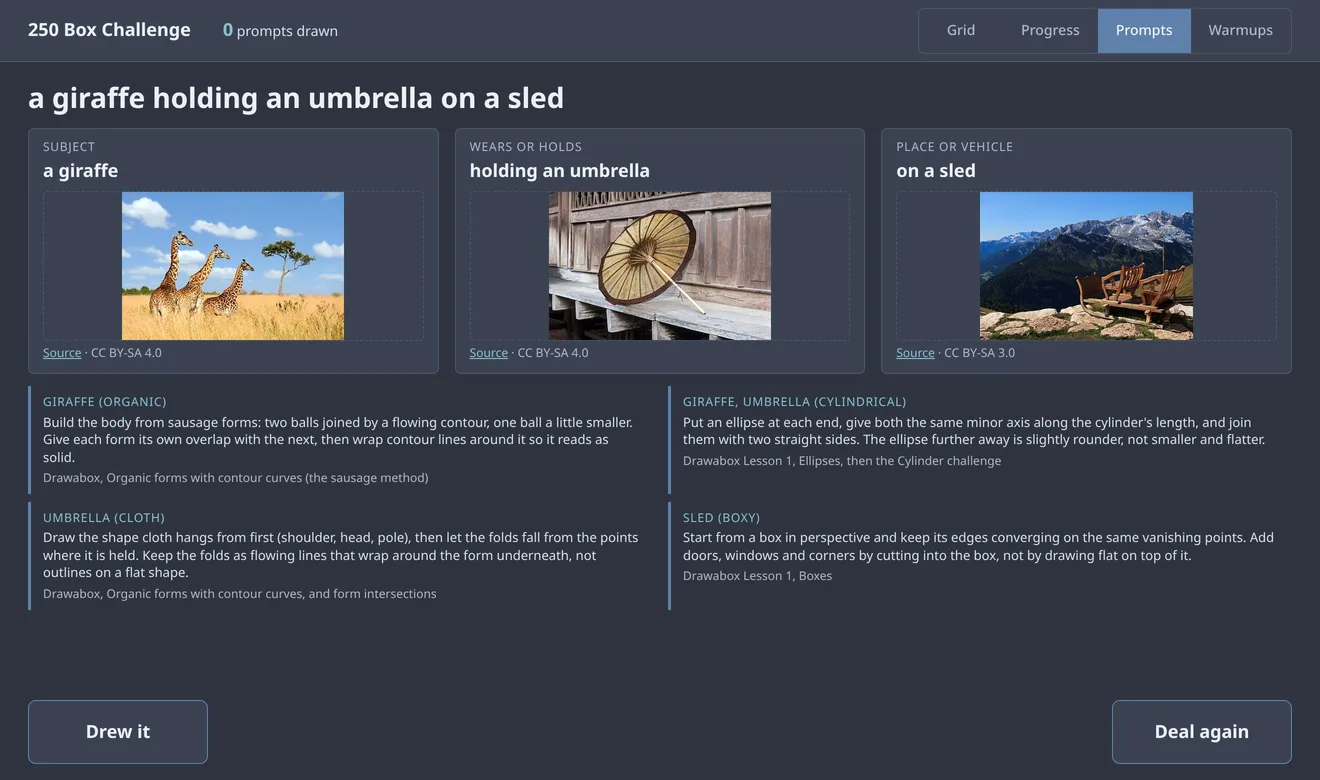
- Three parts. One from each of three lists. Nothing repeats within the last ten prompts.
- A reference for each part. An openly licensed photo from Wikimedia Commons with its source link and licence under it (here by Byrdyak, Basile Morin and H. Zell, all CC BY-SA), kept on the computer once fetched. A folder of my own pictures beats it. The text never waits on the network.
- Drew it. The drawing happens elsewhere. The app keeps each prompt with a tick for whether I drew it.
- Warmups
Drawabox asks for 10 to 15 minutes of warmup exercises before each session.
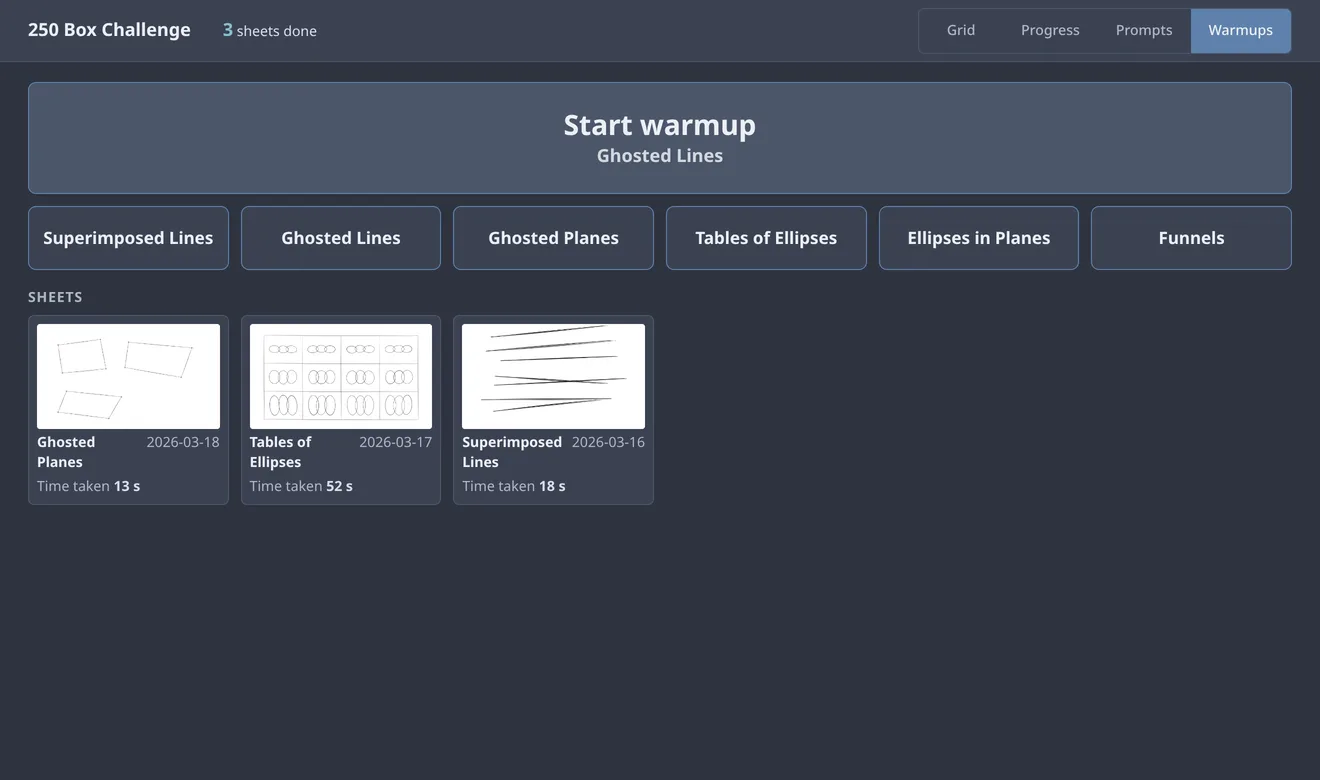
- One button to start. It names the exercise I finished least recently, so I don't have to choose before I can begin. There's no randomness in the pick.
- The course's own names. Six exercises, named the way the lessons name them, so the app and the lesson use the same words.
- Finished sheets. Pauses over two minutes don't count toward the time.
- Kept apart. Sheets never appear in the box grid, the progress view or the work-on line, so 250 boxes still means 250 boxes.
- Warmup sheet
A sheet is the box canvas on a wider page.
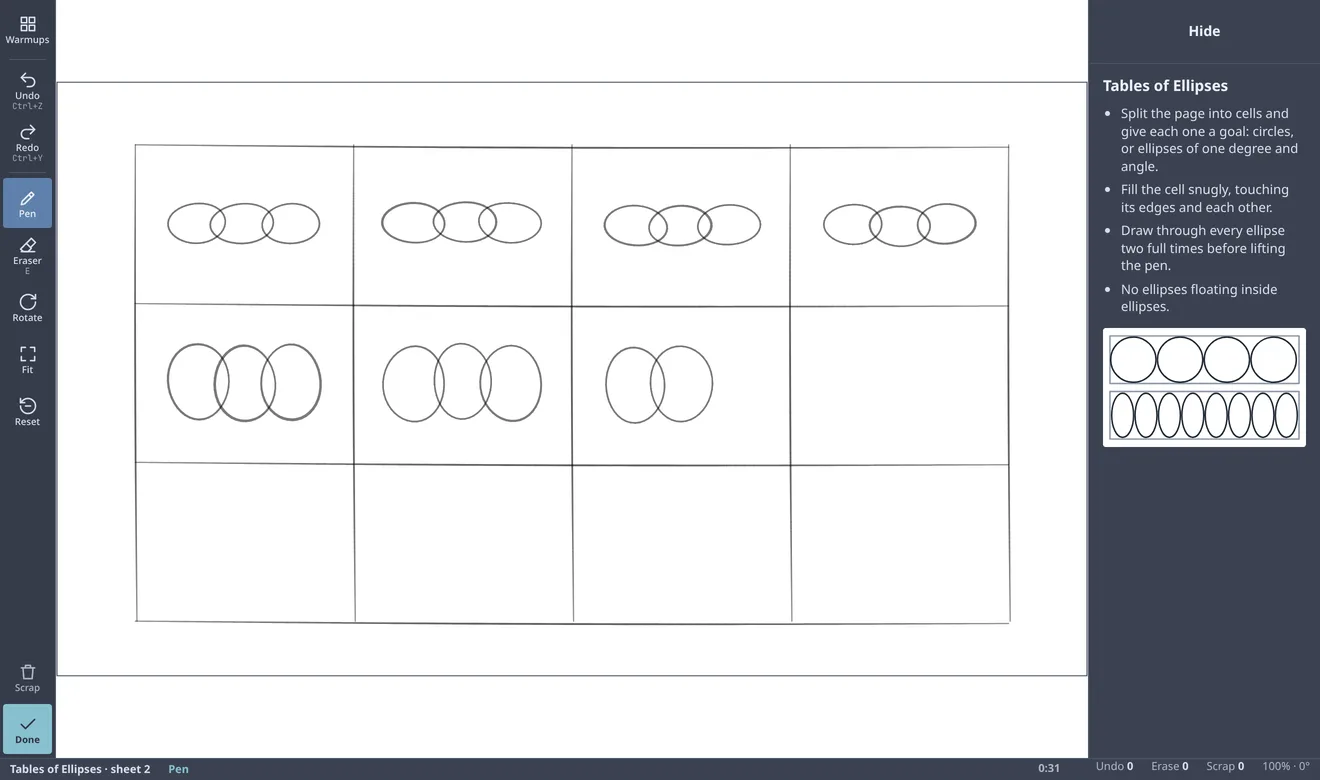
- The same board. Same brush, keys, pan, zoom, rotate, eraser, undo, scrap and done as a box, so nothing has to be learned twice. The top button goes back to Warmups instead of the grid.
- The page. 2600 by 1500. It's as tall as a box's square, so a line is the same size on screen in both, and as wide as still fits the display.
- The card. A few short rules for the exercise, written for the app rather than copied from the lessons. Hide folds it to a narrow strip.
- The diagram. Drawn for this app, not copied from the course, so nothing in the project is someone else's artwork.
- The timer. It starts at the first stroke and changes colour at 10 and 15 minutes, the warmup window. There's no sound and it never stops me drawing.
- How it was built
In milestones, starting with drawing and stamping a single box. The part that reads a box is a plain function, strokes in and result out, so it's tested without a browser or a tablet.
A generator draws boxes toward chosen vanishing points with a chosen amount of wobble and error, so each test knows the right answer. Browser tests draw with fake pen input, pressure and hover included, against a scratch database.
Every change was checked again on a clean copy merged with the latest code before it went in. That came to about 680 backend tests and 151 browser tests.
The pictures on this page come from a throwaway copy holding my boxes, with the dates changed and my notes left out.
Have something in mind?
A few sentences about the problem is enough to start.
contact@JordanAdair.ca