Desktop app
Daybook
My days were spread across five apps that couldn't see each other. Daybook is one app that holds all of it.
- Kind
- Desktop app
- Built with
- Python, SQLite, FastAPI, React
- Data
- Stays on the computer
- The problem
For over two years I ran my days across five tools. My journal, habits and money lived in Notion, tasks in Todoist, older history in Google Sheets and health exports in Google Drive.
An n8n workflow drafted a nightly summary from the journal, but the tools still couldn't see each other, so any question that crossed two of them meant pulling data out of both by hand.
Notion won't calculate a value into a page's properties, and those properties were what my overview page read, so I wrote my mood averages and habit checkboxes in by hand. A script handled the health data imports.
Numbers copied by hand drift: whenever one was missed, the overview went quietly wrong while the journal underneath stayed right. Income and expenses sat in two separate tables, so there was no running balance. The health import broke often and didn't say so.
- What I built
One app over one SQLite database on my own computer. No account, no cloud, no tracking.
Nothing that can be calculated is stored, so nothing can drift. Averages, habits, balances and goal progress are worked out every time a screen asks for them.
Below is every main screen, filled with invented data.
- Dashboard
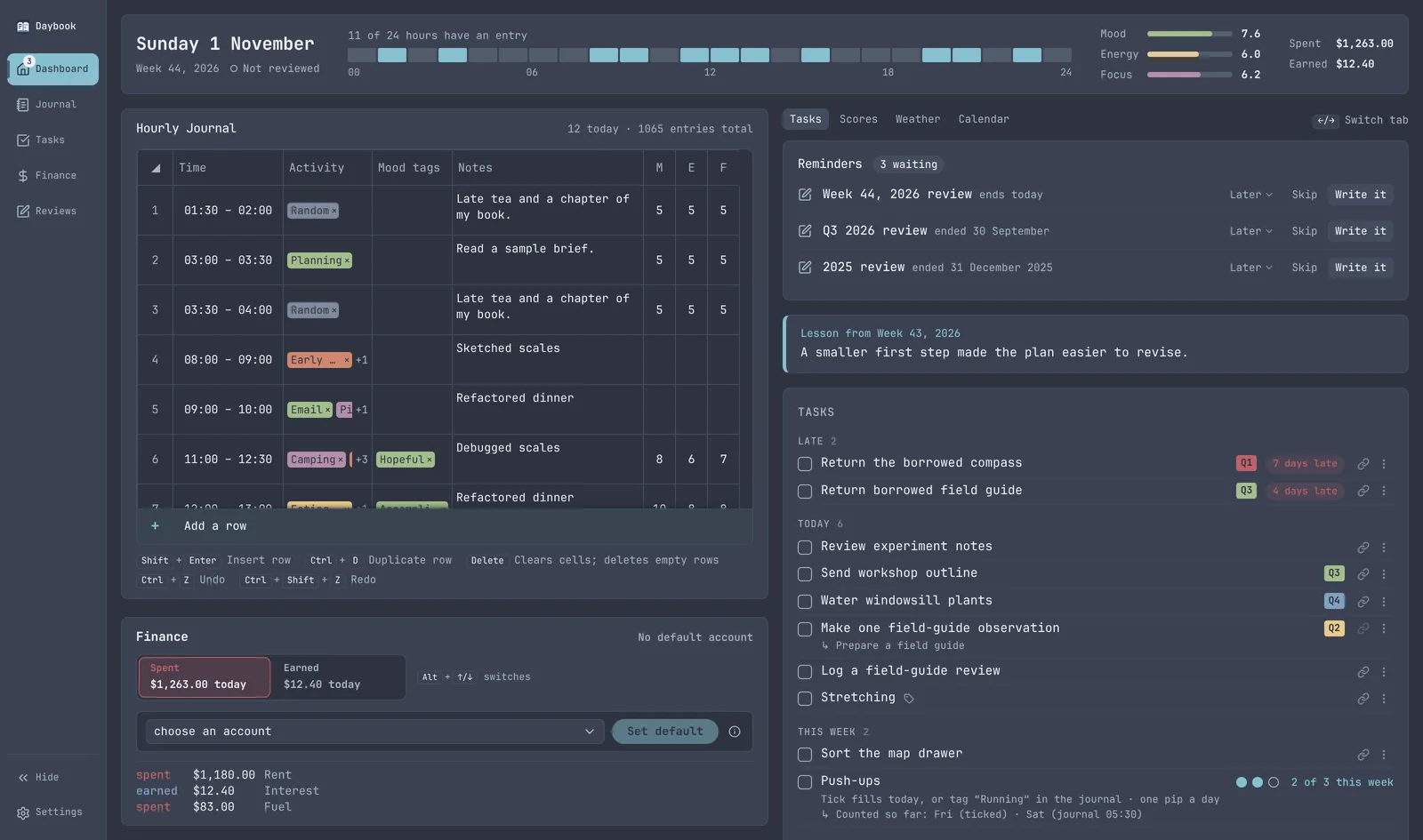
The page it opens on. It's always today, and it replaces the Notion page I used to make from a template every day.
- Today at a glance. It reads the entries below and stores nothing of its own.
- Today's journal. The same grid as the Journal tab, cut down to today. Anything typed here is dated today, with no date picker. Picking a date is the Journal tab's job.
- Shortcuts with labels. A keyboard shortcut ships with a visible two or three word label or it doesn't ship. A tooltip only reaches someone who's already holding the mouse. Once I've learned them, Settings hides the hints.
- Quick money entry. One switch is both Spent or Earned and today's total for each. The list under it is read-only; fixing an old entry is the Finance tab's job.
- One panel at a time. The right column is tabs. It used to show everything at once and felt crowded, and the dashboard is about today first. Every panel stays loaded, so switching is instant and nothing jumps.
- Reminders that stay in the window. Only the review that's due now at each cadence. There's no desktop notification.
- Last week's lesson. The weekly review asks for a lesson for next week. In Notion that meant pasting it onto every new daily page, so it died. Here it just shows up.
- Ticking where I already am. The task box is for ticking things off and seeing what's due, which I do many times a day. Repeats and goals live in the Tasks tab.
- Journal
Every hour I've logged, for reading back and making edits to past entries.
This tab can go unopened for months. Its job is letting me correct an entry from three weeks ago.
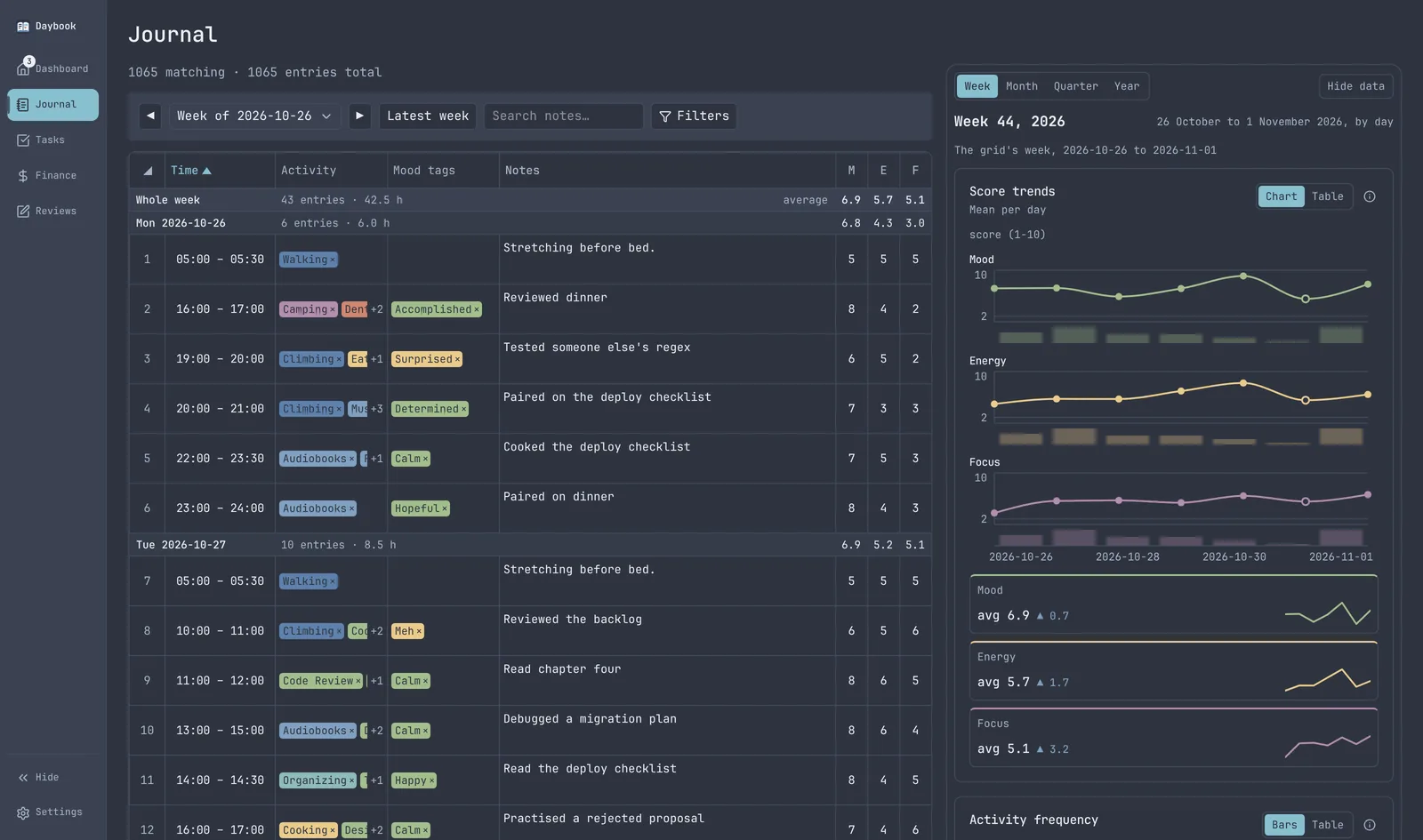
- A grid I type into. Range selection, copy and paste, duplicate a row. Entry is the thing I do most, so a change that makes it slower than the Notion table it replaced counts as a step backwards, however nice it looks.
- Tags mean "this happened during this hour". Most hours hold more than one, so the charts count hours containing an activity, never hours spent on it.
- Averages per day. Each day's row carries its mean scores, where days get scanned. In the old setup those averages only existed to be copied by hand into page properties.
- The data beside the entries. Score trends and activity charts for the week, month, quarter or year, next to the rows they come from. Notion's charts were clunky and I was paying for them. Hide data drops the column when I only want the grid.
- Tasks
The Todoist replacement. The switch at the top has two more views: habit progress and goals.
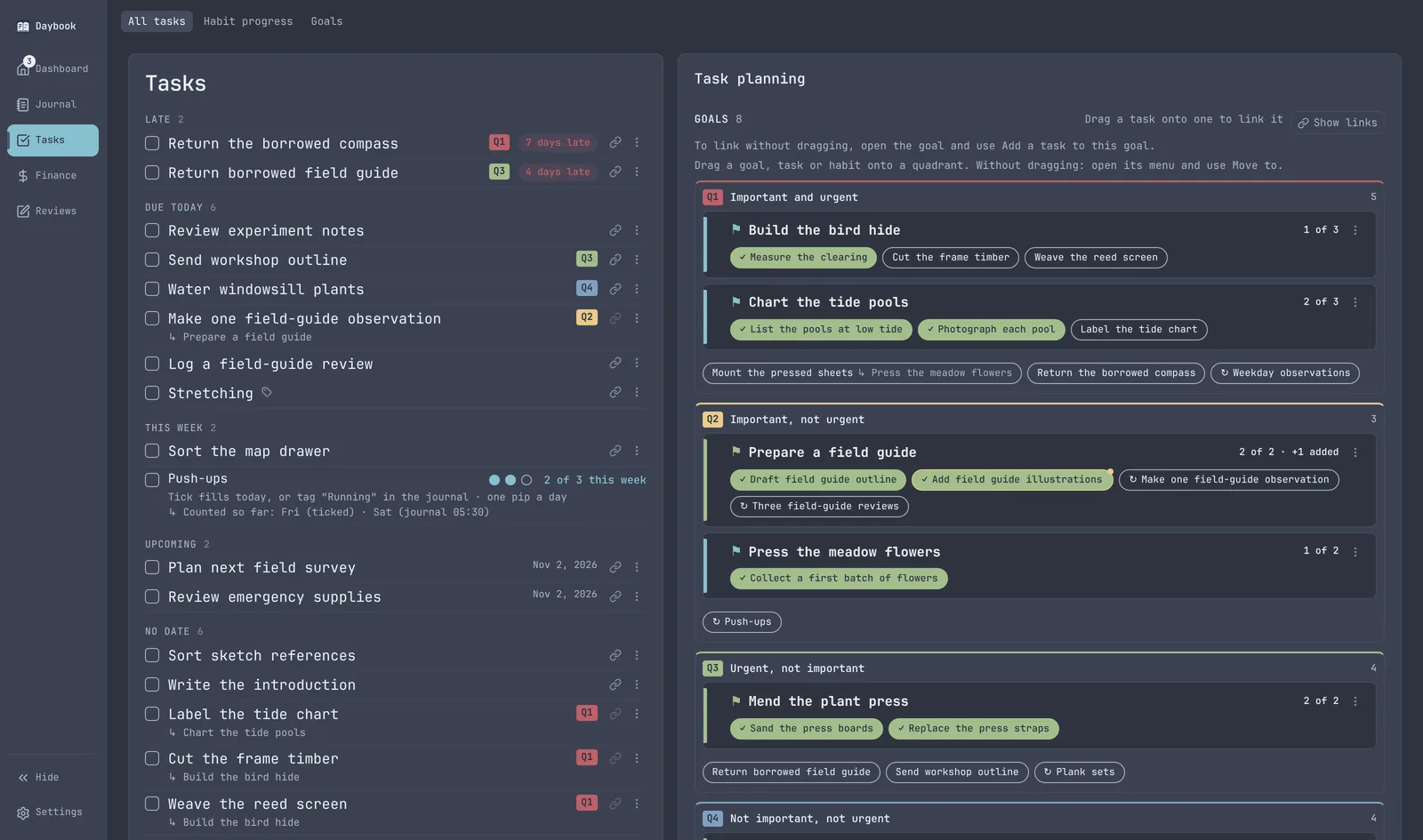
- Late, and by how much. A one-off task past its date says how many days late it is. How long I've been avoiding something is usually the most useful thing that row can say.
- Repeats show once. A repeating task never piles up. Two weeks away doesn't leave ten rows of the same chore to clear by ticking things I never did.
- Tasks and journal agree. A task can link to an activity tag. Ticking it tags that hour in the journal, and tagging the hour ticks the task. There's no sync step, and no second account of the same day.
- Planning by quadrant. Goals, tasks and habits sorted into the four urgent and important quadrants. The Q badge on a task shows its own quadrant, or its goal's when it has none.
- Habit progress
Habits sit inside Tasks rather than in a tab of their own.
A habit is never ticked directly. It's worked out from what's already recorded, like a ticked task or a tag in the journal, and it counts if any of them fired.
Before, I ticked habit fields by hand, and they went stale whenever one was missed.
There are no streak counters anywhere, so one gap doesn't wipe out the record of a good run.
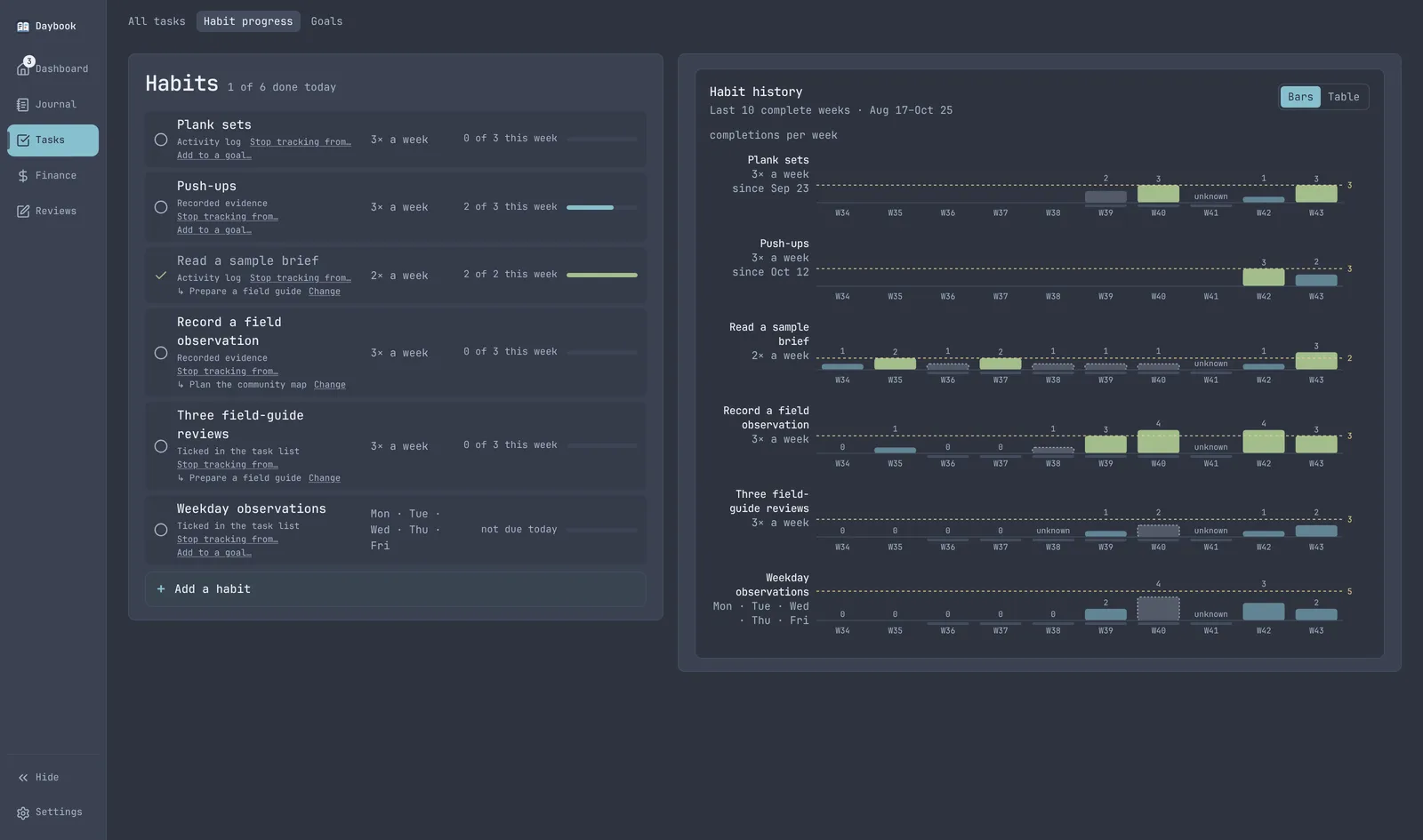
- A count, not set days. Three times a week is a count, so it doesn't have to pretend to be Monday, Wednesday and Friday.
- One bar per week. The dashed line is the target. A grid of day cells would turn a perfect Tuesday, Thursday and Saturday week into three misses.
- Unknown isn't missed. A day with nothing recorded at all reads as unknown, so being away isn't scored as failure. A day I was logging without the habit still counts as missed.
- Goals
The third view in Tasks. Goals have never worked for me because they're hard to break down and track, so this view is built around breaking them down.
A task that repeats every day has no total, so a repeating task keeps the goal moving without counting toward the burnup.
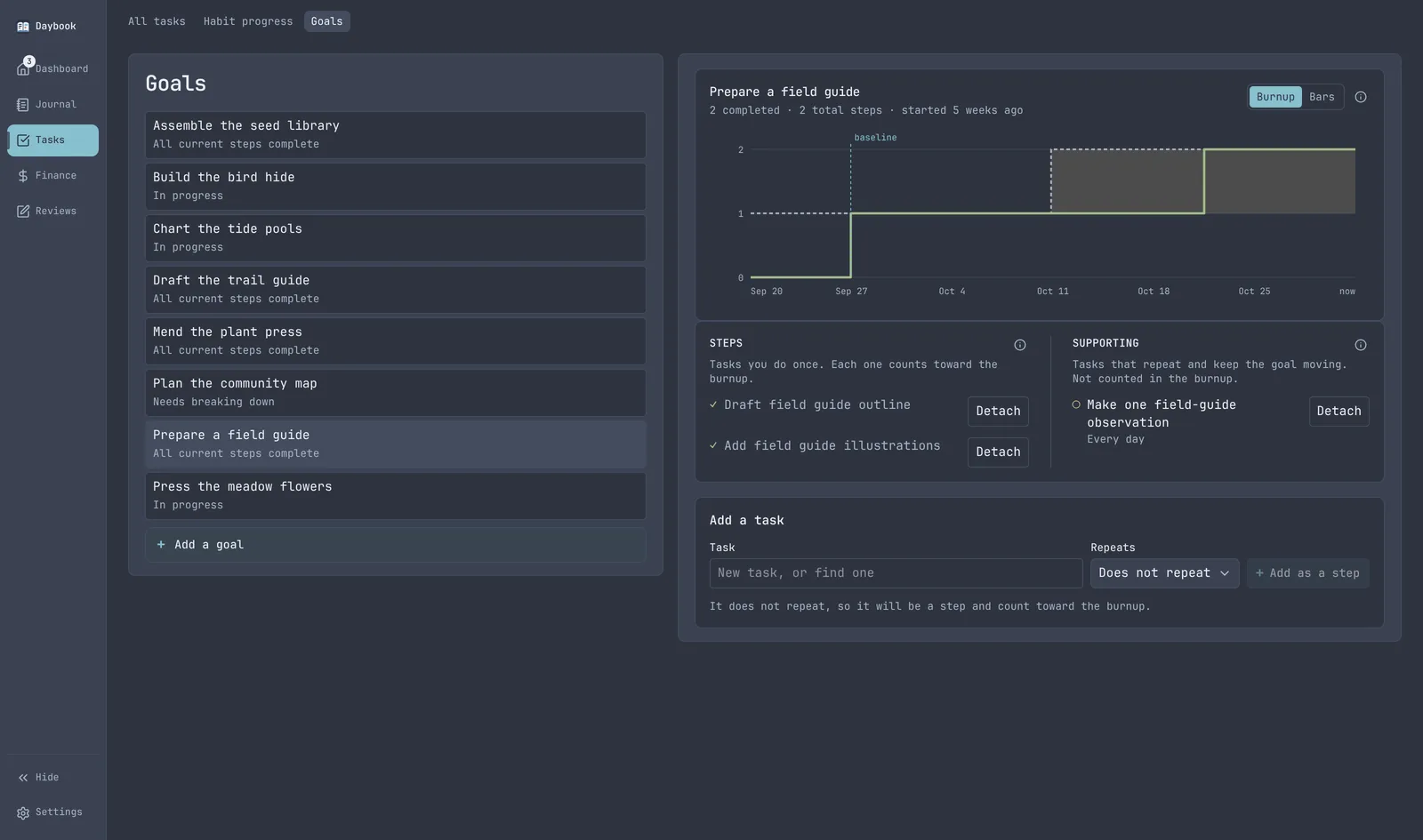
- Goals live with tasks, because a goal is made of tasks. One is done when its steps are, with no separate button to mark it done.
- Needs breaking down, never 0%. A goal with no tasks says so. A 0% bar reads as failure, when what actually stalled was breaking it down.
- Progress is a burnup. A chart of done against total, as two separate amounts. A percentage would drop every time I split the work into more steps, which is the thing I want to encourage.
- Added scope shows. Steps added after the goal was set get their own shaded segment, so a goal that grew is visible instead of silent.
- Finance
Spending and income, one month at a time.
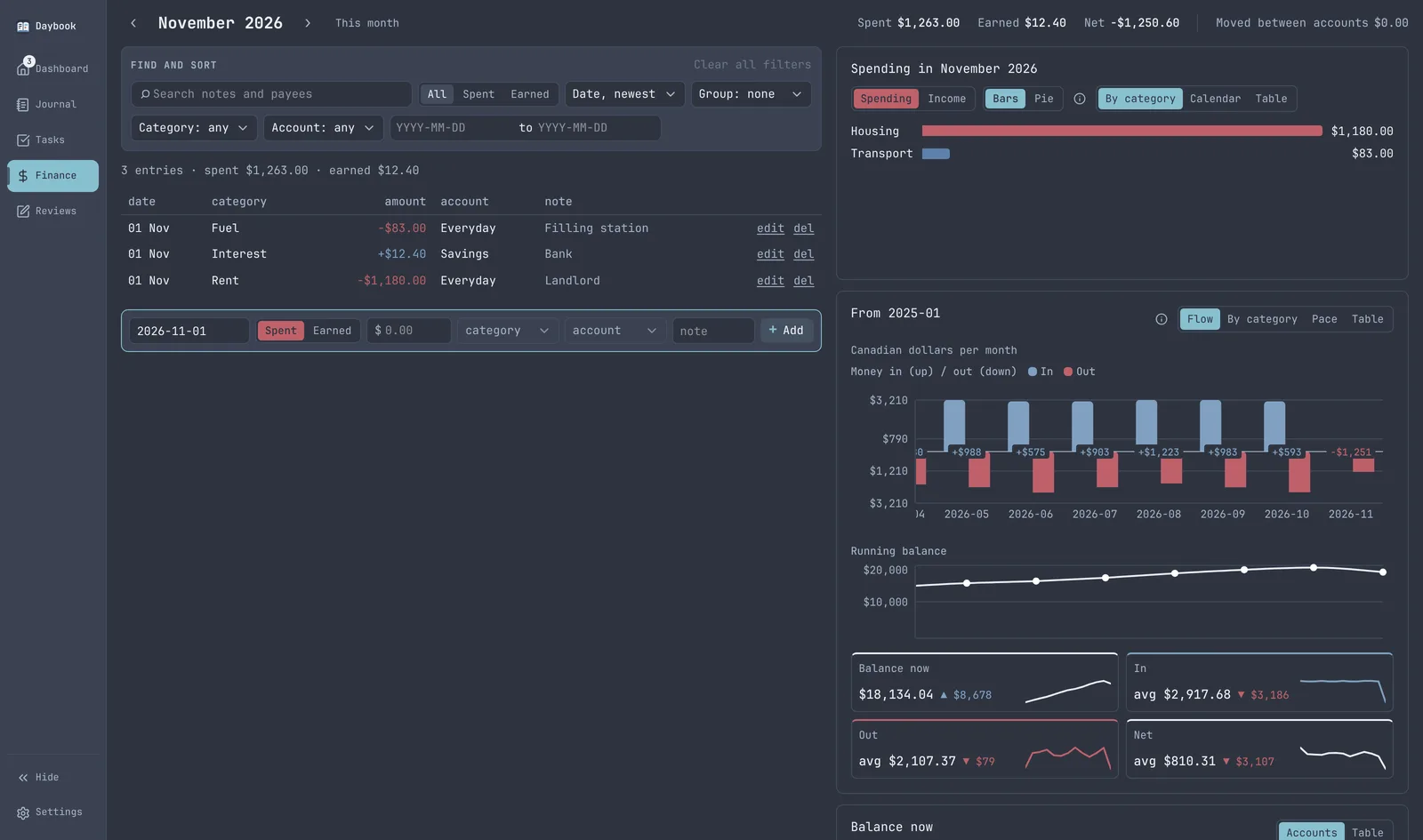
- Opens on this month. Every tab opens on the period I'm most likely to want and says which one. The arrows reach any other month.
- One list, signed amounts. In Notion, income and expenses were two tables with identical columns, which made a running balance impossible. Here it's one list: money in is positive and money out is negative.
- Backfill anything. The add row takes a date, and every row edits and deletes in place. No tab is a dead end for its own data.
- Categories roll up. Rent and fuel count toward their parents, housing and transport.
- Moving money isn't spending it. A transfer between my own accounts sits apart from spent, earned and net. Counted on both sides, a move to savings made a month look richer and poorer at once.
- Reviews
Weekly, monthly, quarterly and yearly reviews, with the numbers already filled in.
I used to open a Notion template every week, month and quarter and copy numbers into it by hand. That copying was the whole cost, and it made a review feel like admin. Here the figures are already filled in.
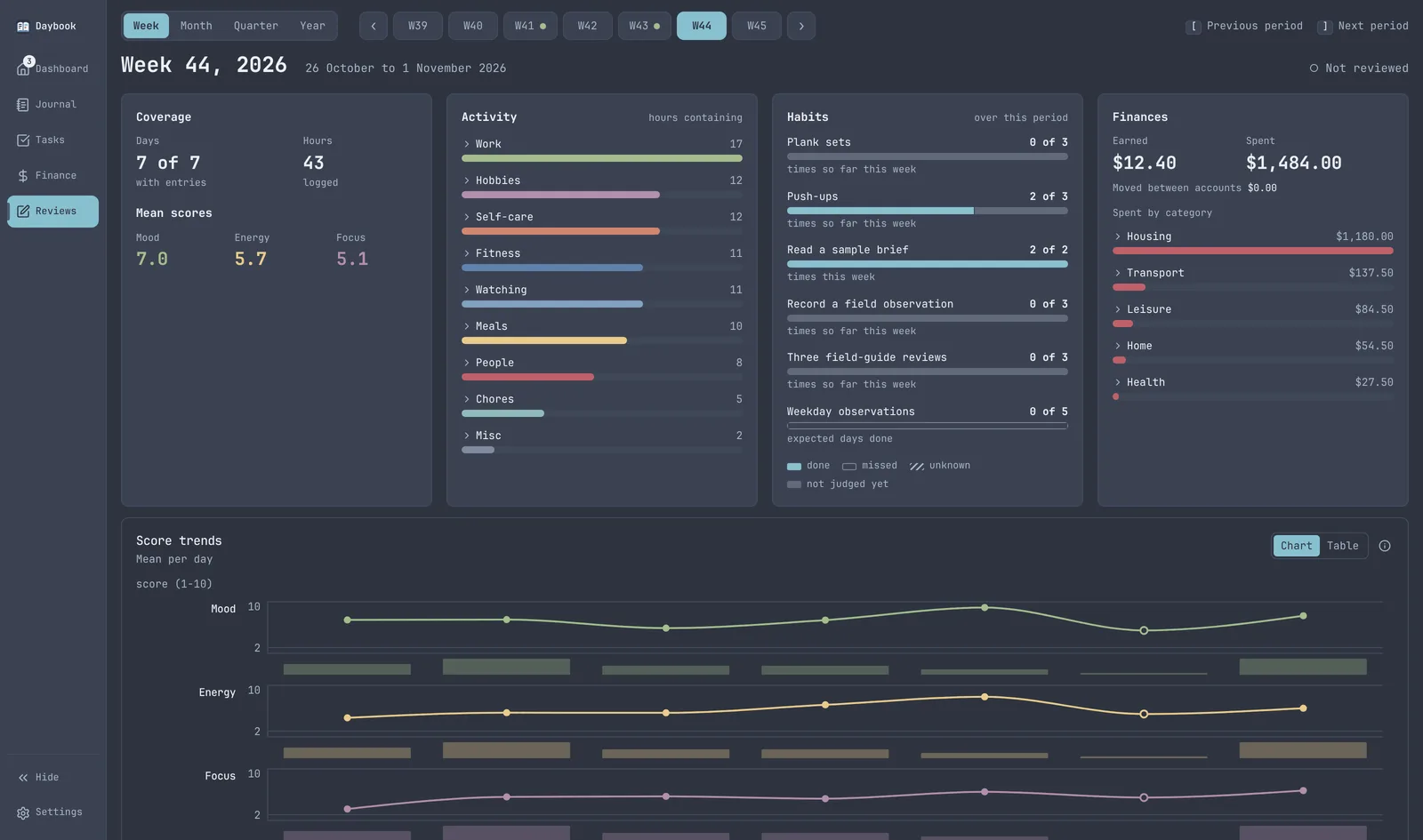
- One page, four cadences. The switch only changes the period picker, so the page I learn once is the page at every cadence. Four templates would have been four things to build and four to neglect.
- A dot means reviewed. Browsing old weeks never creates a review, so the dot only appears on periods I actually wrote up.
- Late is fine. Any period can be written up at any time. The dates record when, and nothing scolds me for it.
- Moving the old data in
The old exports were messier than they looked. Five time ranges were malformed, 211 notes had line breaks inside them, two entries claimed the same hour and one expense row was completely blank.
Notion's default export also silently left out 75% of the journal (it kept 255 of 1,035 rows) unless you took the second, full file it ships beside it. The importer keeps the original rows exactly as they came before it cleans anything, and the tests copy those bad shapes with made-up values.
- How it was built
In small slices, each one planned before it was built. Every open question was settled once and written down, so later work can't quietly undo an earlier choice.
Every change has to pass the same checks before it merges: about 2,400 backend tests, about 1,700 frontend tests, type and style checks, and a scan for leaked passwords and keys. They run again on the merged result.
Every screen is built and judged against a demo database of invented data, never my own.
Have something in mind?
A few sentences about the problem is enough to start.
contact@JordanAdair.ca