Desktop app
Foreman
I was holding my agents together with terminals, GitHub issues and a manager session I had to reset by hand. Foreman is the app that does that work.
- Kind
- Desktop app
- Platform
- Linux first
- Shell
- Electron, xterm.js
- The problem
I run coding agents on several projects at once, and the tools between them were glue I held together by hand.
Edits scrolled past inside the chat, so I couldn't see what changed or point at a line and ask for a fix. Agents started by other agents never showed up in the terminal.
To work through a backlog I started a manager session in each project, reset it when its context filled, and watched it spend its first stretch learning the project all over again.
Anything only I could answer came as a GitHub issue assigned to me, which I had to find, answer in a comment, and wait for a later session to pick up.
- What it does
So far Foreman is a written design and a clickable prototype. Every project lives in one window, and the orchestrating is plain code, not a chat session.
It holds the backlog and who is on what, picks batches of work that can't collide, and hands each card to an agent. A card lands only after a fresh agent has checked it and the checks pass on the merged result.
An agent that nears its context limit is retired, and its replacement starts from Foreman's records, so nothing relearns the project.
Below are the main screens of the prototype, filled with invented projects and cards. Where a picture carries a number, it matches a note under it.
- Cards
Every job is a card. Agents build them, a second agent checks them, and anything that needs me sits at the top.
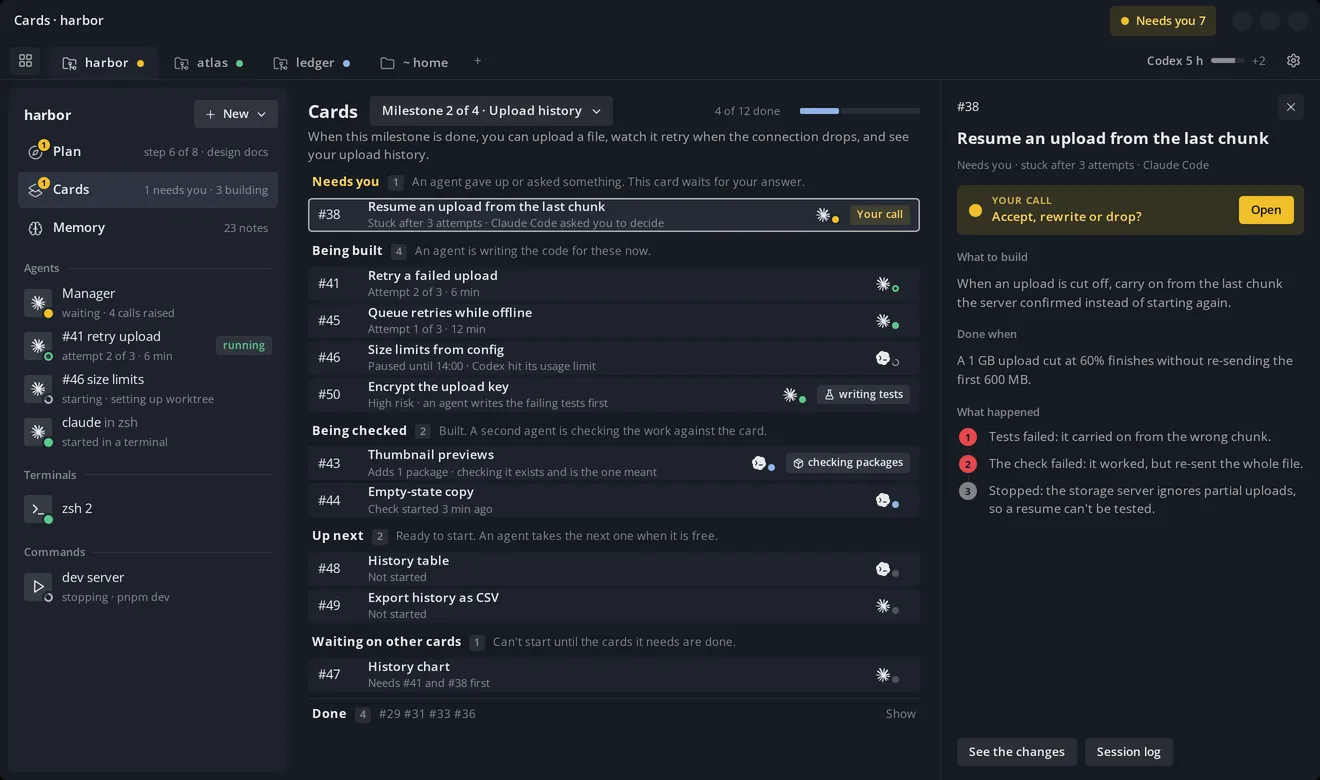
- A tab per project. Each tab carries a dot that rolls up its most pressing row, so the tab bar alone says which project wants me.
- One tree. The project's agents, terminals and commands in one list that I read once. An agent started by another agent shows up here too.
- Three attempts, then me. The last try starts in a fresh session, because an agent that has failed twice is the least likely to see why. After that the card comes to me, so nothing loops forever.
- A usage limit isn't a failure. The card pauses until the limit resets and says when. A hard job finished by a much weaker model is worse than waiting.
- Tests first on risky cards. A different agent writes the failing tests before the work starts, so the agent doing the work isn't the one grading it.
- Checked by a fresh agent. A report is a claim. The checker reads the change against the card and treats the report as unverified. New packages are checked against their registry, since a made-up package name can be one someone has registered.
- Done when, as an outcome. Every card says what to build and what done looks like, written so an agent can't meet it to the letter and miss the point.
- An agent's session
Each card's agent runs in its own session, one click from its changes.
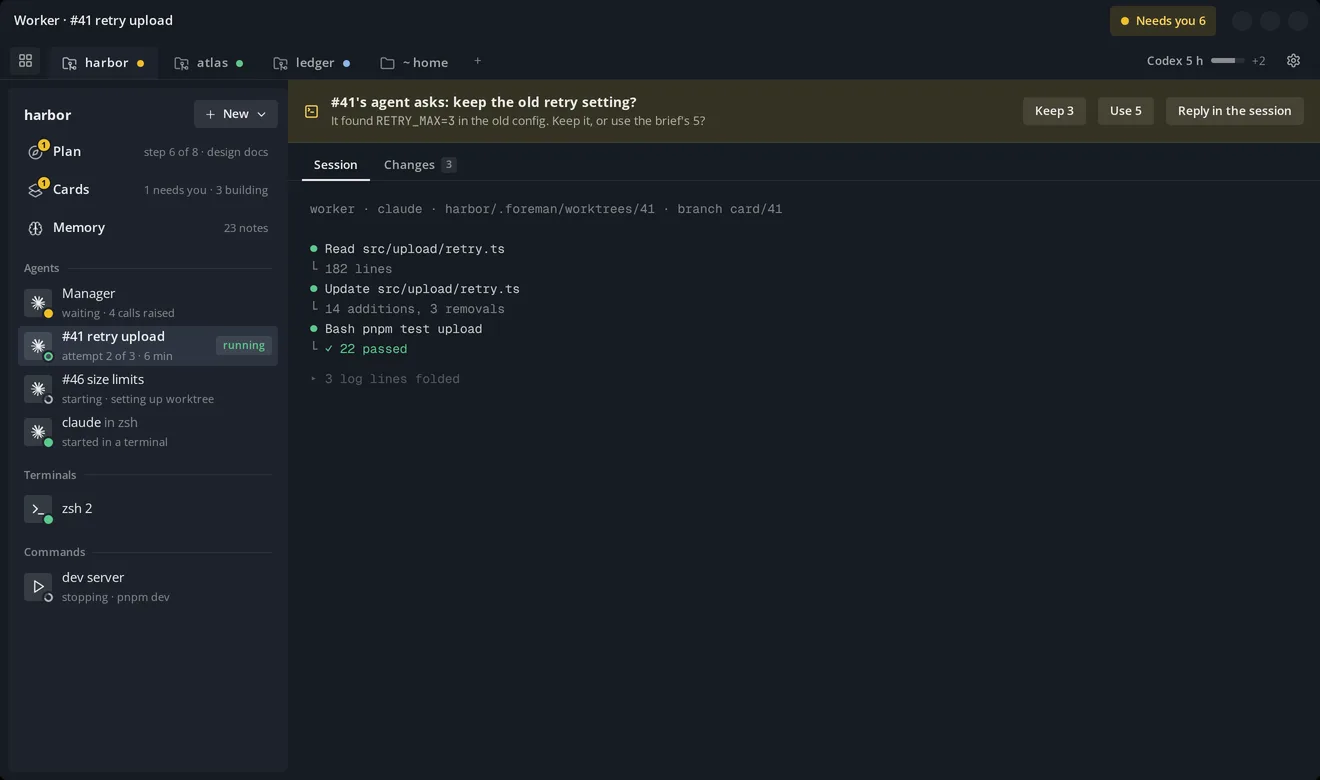
- Its own copy of the code. Each card gets its own worktree and branch, so git stays under one owner and two agents never edit the same area.
- Changes
The code a card changed, file by file, where I can comment on a line and send it back.
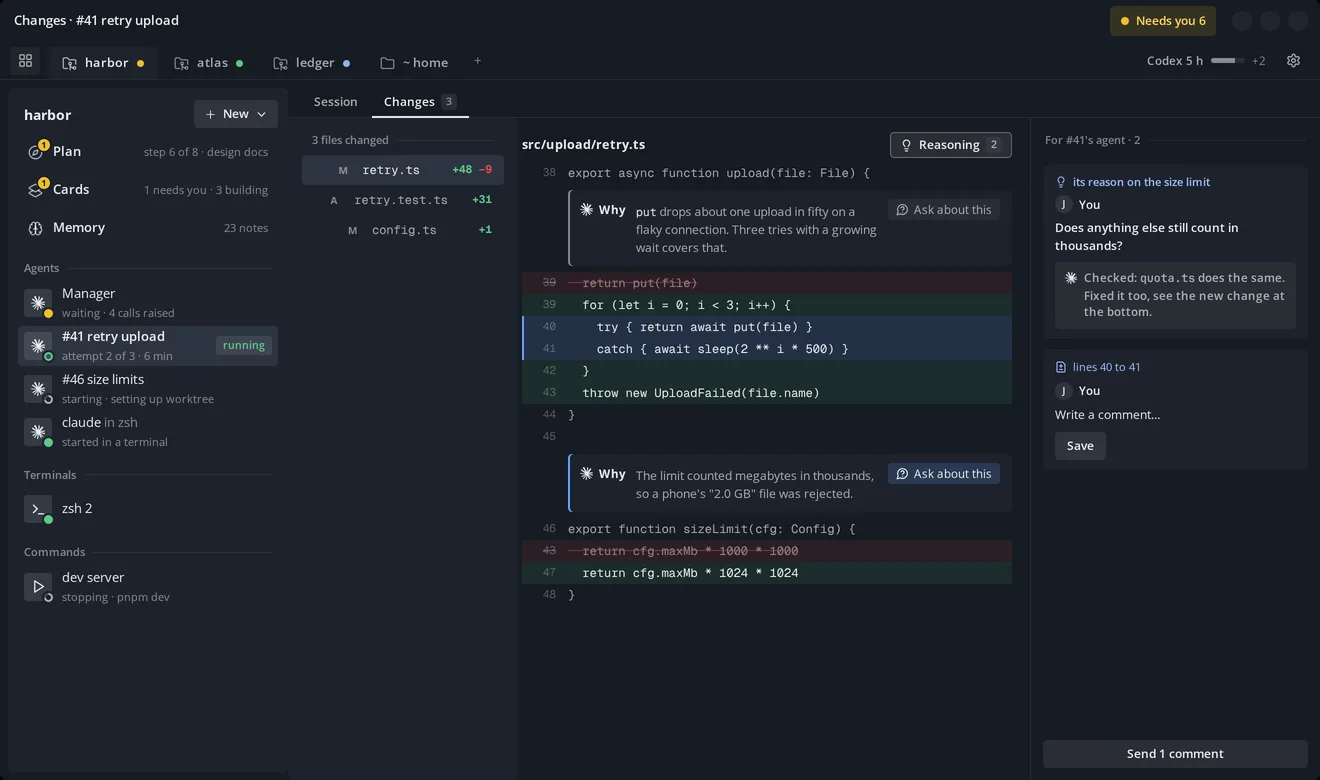
- Reasoning. I added this so I could learn from the changes, not just accept them. It shows the agent's own words from before each edit beside the code they explain. It costs nothing extra, and when the agent gave no reason, none is shown.
- Ask about a reason. The question goes to the agent that wrote the change, and the answer lands beside the code. Here it found the same mistake in a second file and fixed that too.
- Point at a line and ask for a fix. Select lines, comment, and send the comments back to the agent that wrote them, so it fixes them without me copying context into a chat.
- Needs you
Everything waiting on me, across every project.
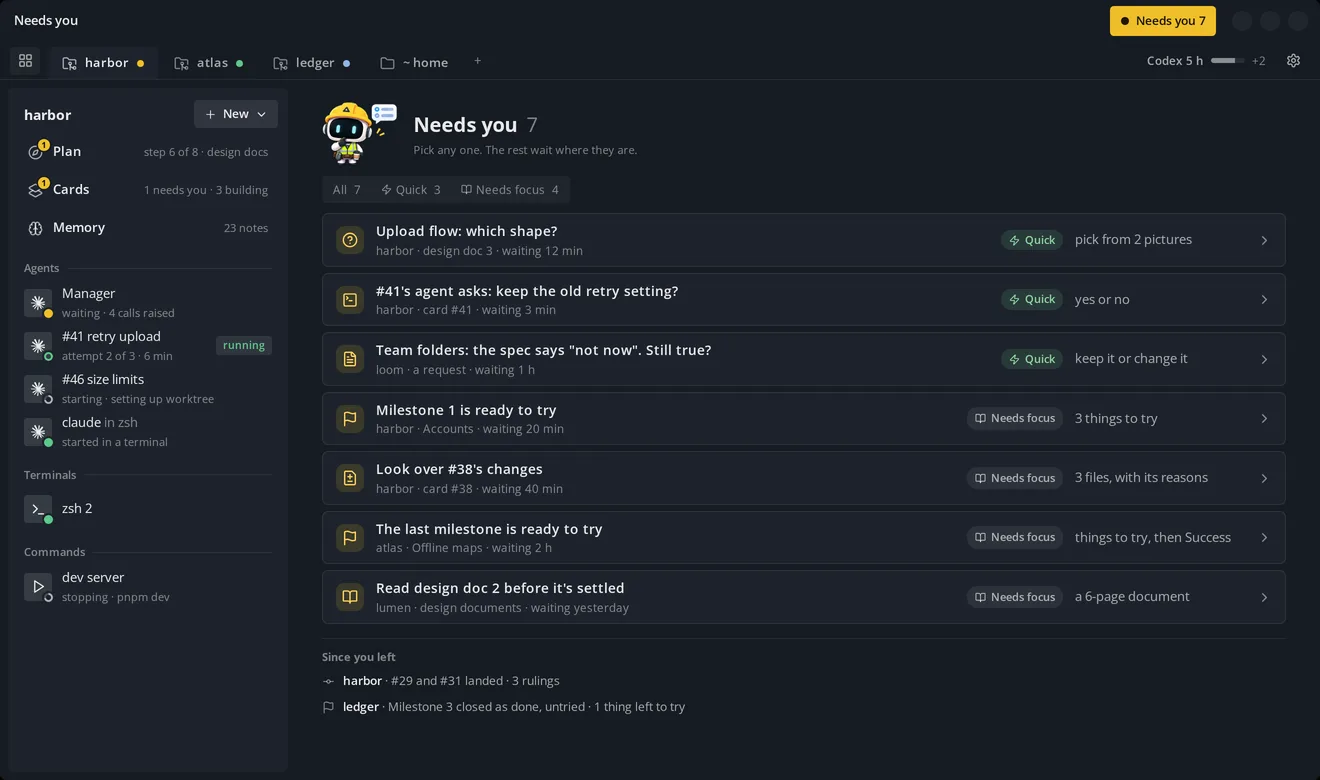
- Quick or Needs focus. Each item says how much of me it needs, so I can see it all at once and clear the small ones first.
- Since you left. What happened while I was away that didn't need me. A ruling nobody sees is a decision made in secret, so it's shown.
- A decision
When a choice is really mine, it gets its own page.
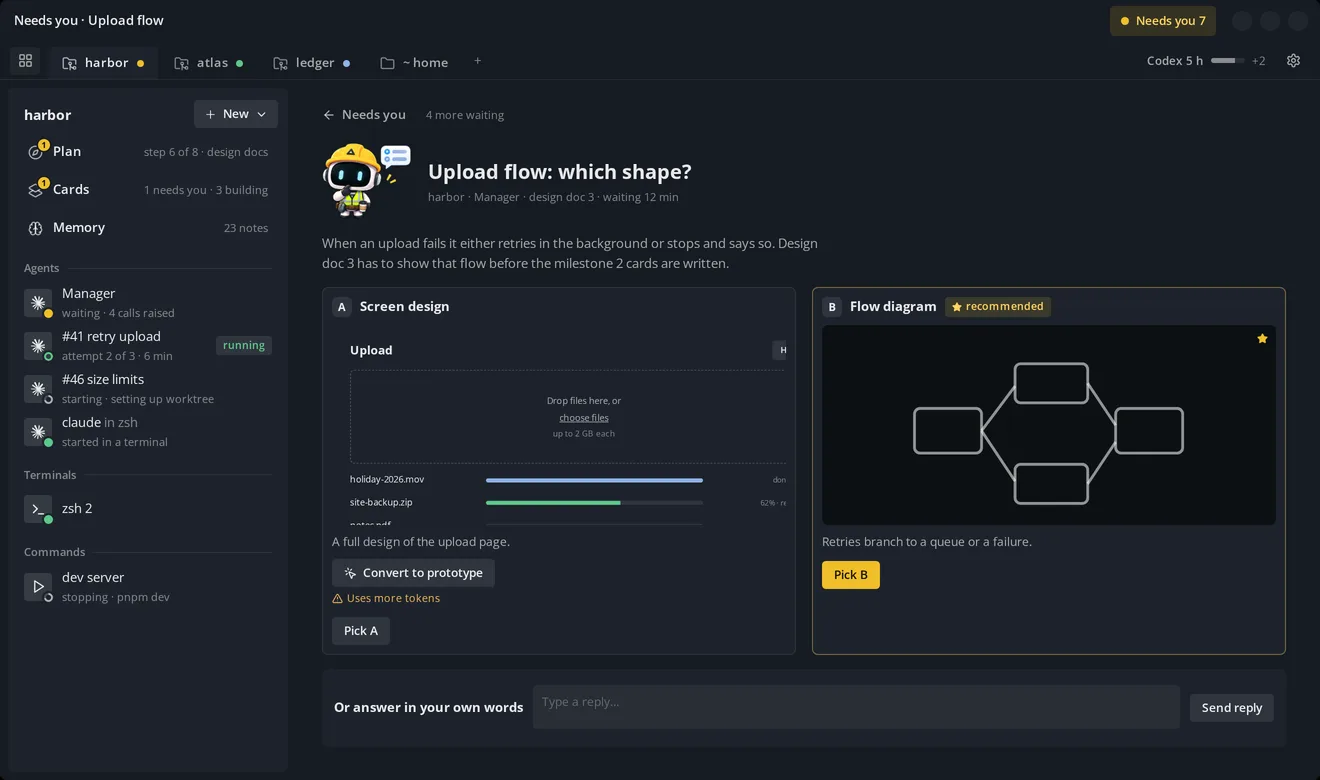
- The mascot. Foreman's hard-hat robot, designed with an AI sprite pipeline tool I made.
- Options drawn, not described. Word-only options are hard to judge at a glance, so every option is a picture. Foreman won't raise a decision without one, or with only one real answer.
- One recommendation. Foreman says which option it would pick, and the pick is still mine.
- A clickable version on request. Clicking through an option helps me feel the gaps and find forgotten panels, but building every option is wasteful when the pictures already exist. So it's one button per option, with the cost under it.
- Where it stands
The plan for a project: the steps that got it here, the milestones, and the risks still open.
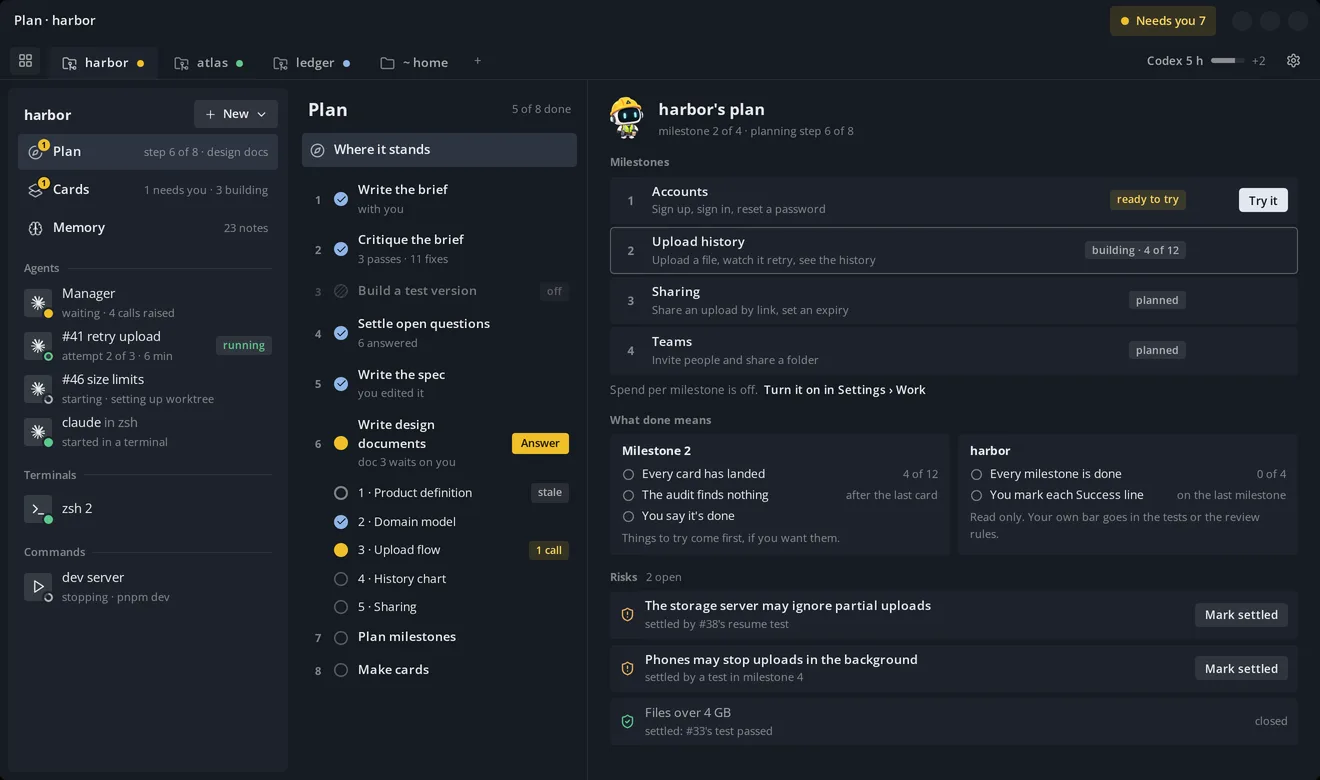
- The planning ladder. The steps run in order, so I don't start each one by hand.
- A switched-off step stays listed. It shows as off, never silently missing. A wrong brief is the most expensive fault in the ladder, because everything after it inherits it, and the test version is what catches one.
- Stale steps. When an earlier decision changes, what depends on it is marked stale, so nothing downstream is trusted silently.
- Risks, and what settles them. Each open risk names the test that would settle it, and closes only on a recorded result or my mark.
- Spend, off by default. Every automatic behaviour is a setting. Spend tracking is off unless I turn it on, and Foreman never suggests a budget.
- Features and fixes
Where new ideas and bugs go in.
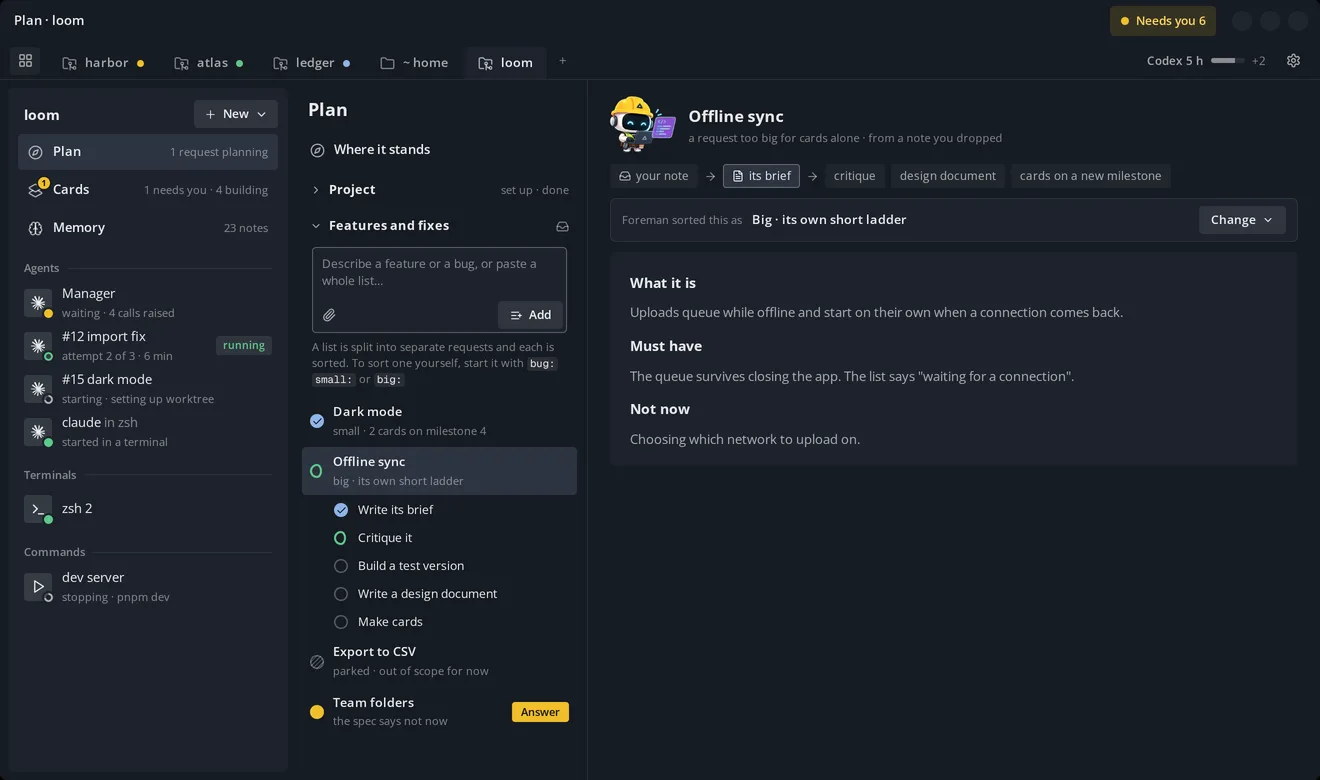
- Drop a note, or a whole list. Notes tend to get written in one go and dumped at once.
- Parked stays listed, with the reason, so nothing disappears.
- A wrong sort is cheap. It's visible, editable, and starts no work until its milestone is sliced.
- Memory
What Foreman's agents know about me and the project. It works with no setup.
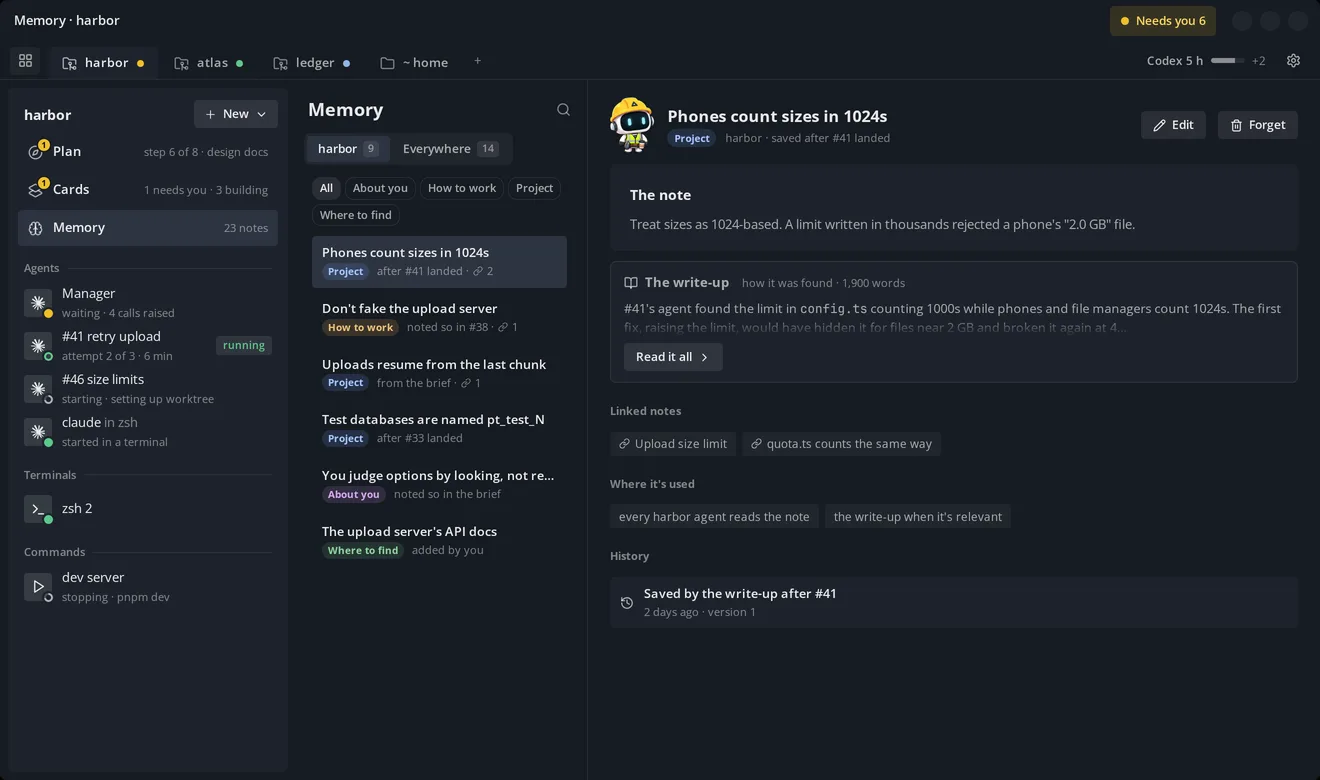
- A short note, and the long version behind it. Every agent reads the short note. The write-up of how it was found is usually a whole article, so it's folded and read only when it's relevant.
- Milestone review
What a finished milestone did, from Foreman's own records.
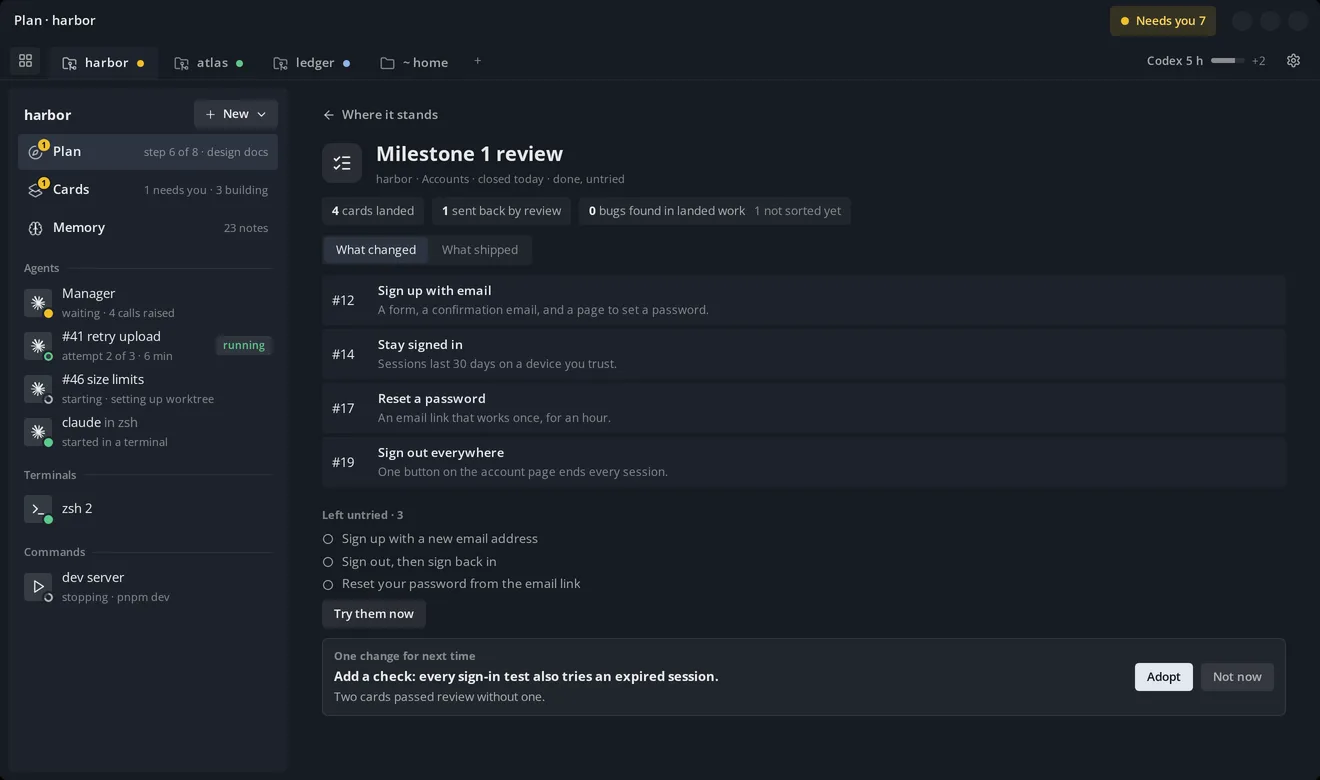
- Records, never verdicts. Every figure comes from what was stored, labelled with its count.
- Left untried, still listed. Trying a milestone is an offer, never a gate, so it can close untried and the list stays.
- One change for next time. At most one change is adopted per review, so the way of working doesn't churn after every milestone.
- First run
Setup, on one page.
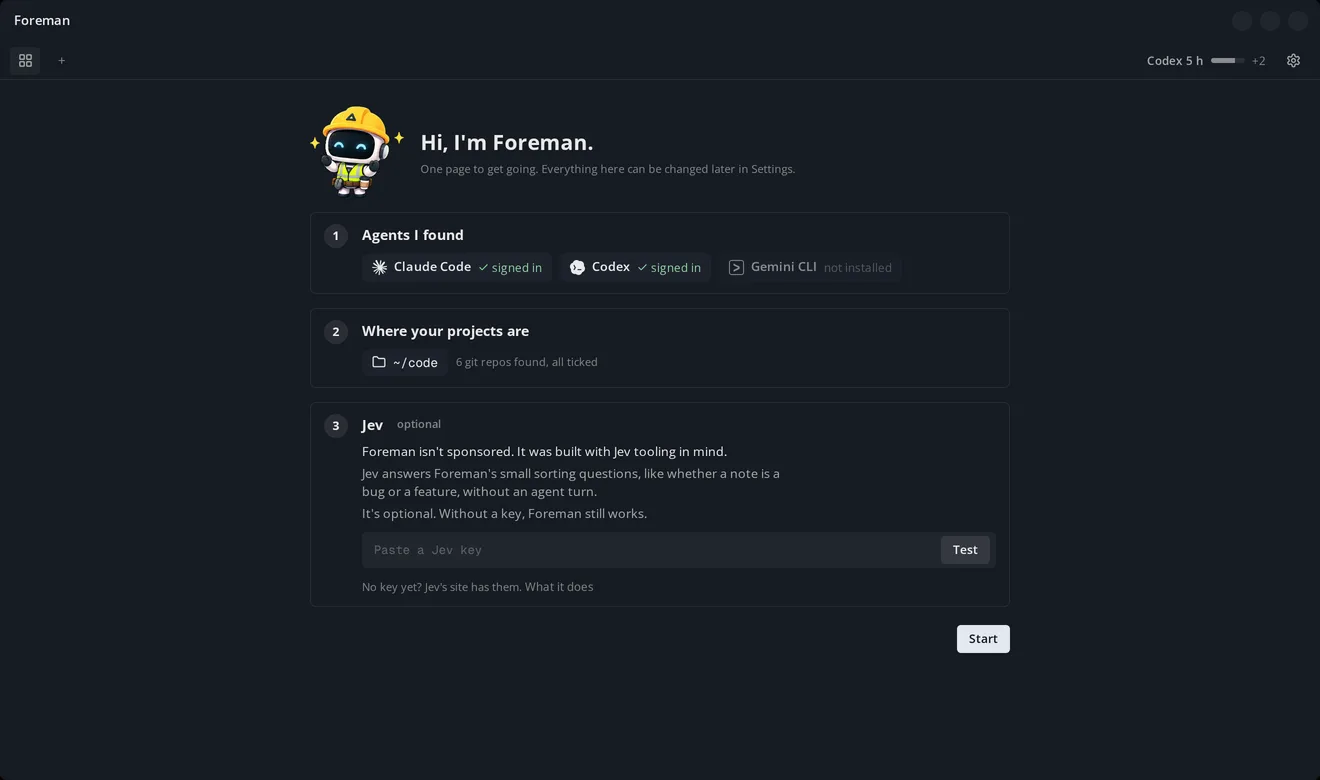
- Where projects live. No path is assumed. It lists the git repos it found there, each ticked.
- A Jev key. Optional, but Foreman is built around it (see below). Without one, every job Jev does falls back to an agent turn or a fixed rule, so nothing stops working.
- Jev
Jev is TypeSafe's decision model. It doesn't write. It answers a question about a piece of text with a yes or no, a pick from a list or a rating, in a fraction of a second, for well under a cent. Most of what Foreman does between agent turns is exactly that kind of question, so Jev answers them instead of spending an agent turn on each:
- Where a new request goes. It picks the milestone that owns it, or says it isn't sure.
- Whether the work meets the brief. It checks an agent's changes against each acceptance criterion, and a clear no sends the card to review.
- Why a check failed. It sorts a failure into code, test or setup, and tells the agent before it starts guessing.
- How risky a change is. It reads the change before it lands and can raise the card's risk, never lower it.
- When to shorten a long session, and what to keep. It judges when the work has reached a natural stopping point, and which parts of the session the next one still needs word for word. This comes from a context-saving plugin of mine that already does this with Jev.
- How it was designed
Before any code, Foreman was designed as a numbered series of documents: the product, the domain model, inputs and integrations, how agent state is read, the orchestrator, and the screens. Each open choice reached me as lettered options with a recommendation, and was settled before the next document started.
The screens were built as a clickable prototype that I used, then changed. The look is one field with sheets on it, hairlines instead of borders, and colour used sparingly.
- How it was tested
There is no app code to test yet, so the tests were on the design.
The briefs went through a critic agent. Then a fresh agent was handed the finished brief and asked to say what it would do, which showed the places it would have to guess.
Before Jev was given any job, I measured it on the issues and merged pull requests of two of my own projects. It sorted new issues into the right milestone 94 to 97% of the time when it was confident, but only for about half of them.
Asked whether a diff met a criterion it hadn't, but one from the same milestone, it said yes 19% of the time. So in Foreman a yes from Jev is never evidence, and it can only raise a risk flag, never lower one.
- What's next
Code hasn't started. The first milestone is workspaces and terminal tabs, so Foreman can replace the terminal I currently do all my work in.
Then the orchestrator, the Needs you page, the review view and the planning ladder (a brief turned into a spec, milestones and issues), each one added where I already work.
Have something in mind?
A few sentences about the problem is enough to start.
contact@JordanAdair.ca